Here's
how to use your Printable Perpetual Calendar Templates
to
make a printed calendar with your own images or for other purposes.
 |
|
For most purposes, the calendars on our phones and other devices are best for tracking appointments, events, etc. There are times, though, when it’s handy to have a printed monthly calendar to display as a notice of target dates for a project or set of events. A printed calendar of photos also makes a special gift.
There are fourteen possible calendars and they're all in this Perpetual Calendar Template kit for you to download and store for your own purposes – to use forever.
Seven are for non-leap years that start on each day of the week, and another seven are for leap years starting on each day of the week.
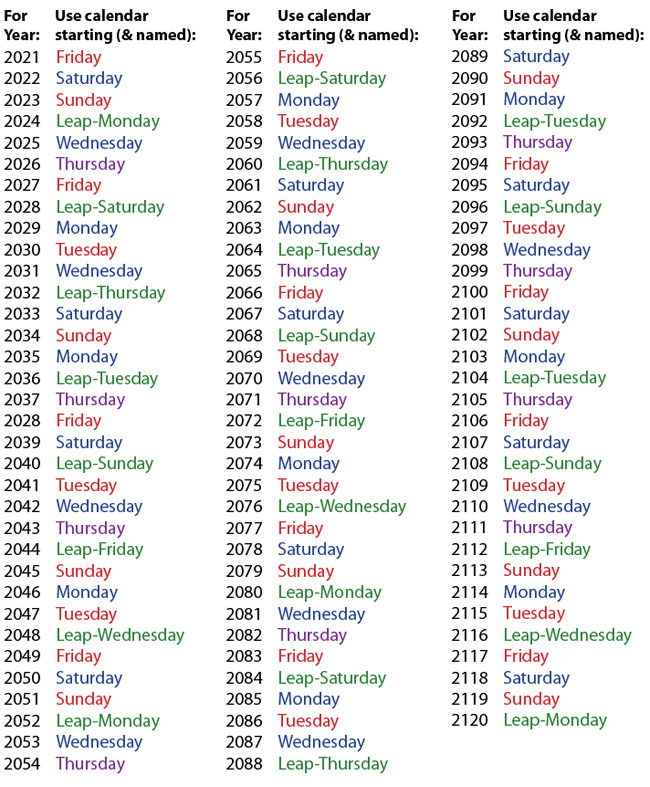
Below is a chart
showing you which calendar to use for which year from 2021 until 2120. A hundred years worth of calendars. |
| (They’ll work for many centuries, but this is a handy index.) |
Make sure you have downloaded this introduction PDF and all fourteen calendar PDFs and Saved them to your hard drive (in an appropriately named folder). This web site will not always be here (nor will we), so make sure you have your own copies and can pass the folder along to other people who might like to use them.
You can simply print all pages of the calendar you want directly from the PDF, but I’ve designed them specifically for those of you who might want to make photo calendars of different formats.
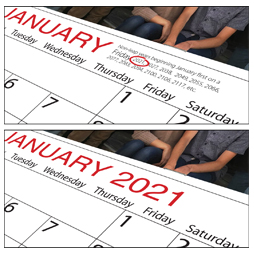
You might circle the specific year on each page or replace the list of applicable years with the specific year as shown here (I used Myriad Pro).
As shown below, I’ve alternated the type color on the various templates so sequential calendars are easy to tell from one another. You'll see once you've downloaded them. |
|
 |
To modify the template pages, open the PDF in Photoshop (or other image editor such as GIMP, a free download). Your computer will ask you which page you want to open. Create a separate Photoshop document for each month. Note that January is page one, February page two, etc.
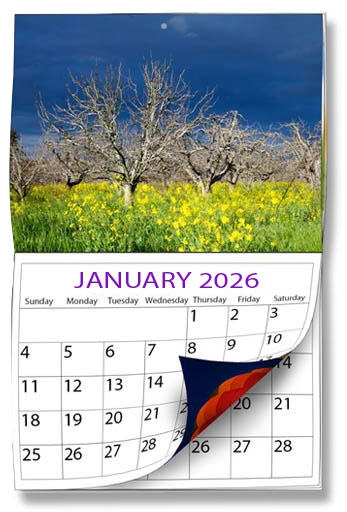
As they are, the calendar pages are 300 dots per inch and US Letter size, so they’re perfect for printing on the bottom half of a Ledger-size (11x17”) folded calendar (shown near the top of this page) with a photo on the top half of each page, folded and stapled in the center. It’s easy to modify the calendars to suit whatever shape you want.
 |
|
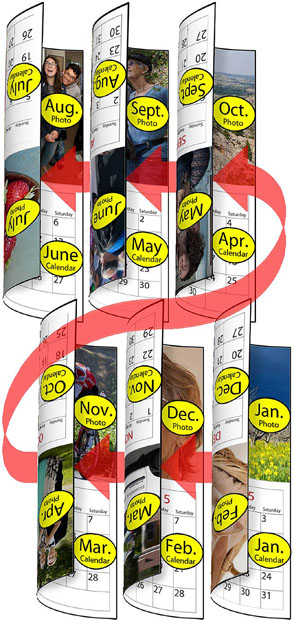
To do that 11”x17” wall calendar which is six sheets printed back to back, stitched or stapled in the middle where they fold to reveal the next month, you’ll need paper which won’t “bleed” through, and you’ll need to do the “pagination” shown at the left.
So, the backs of the pages will seem to be upside down if you turn them like a normal book, but will look right side up if you “tumble” them, turning top to bottom. Staple or stitch the six sheets of paper together right under the photos. Then you can just flip up the current month’s calendar to reveal the next month’s calendar and its photo.
If you’re seen by family friends as a chef as well as a photographer, for instance, you could photograph your twelve specialties (maybe to match the month) and either leave room in the photo to superimpose the recipe or put it next to the calendar rectangle on the bottom half of the page |
Calendar trivia: Leap years don’t occur at the start of a century unless they’re exactly divisible by 400. There are seven non-leap years after 2096, for instance, instead of the usual three, because 2100 isn't a leap year. Notice that usually leap year calendars are used every 28 years. The Leap-Friday calendar which would have been used in 2100 is skipped over that year, making it 40 years between its use in 2072 and 2112. See, I said it was trivia.
Have you ever noticed there are about a week more odd-number days in a year than there are even-number days?
You’ll need to download and Save all 14 of these calendars
to be able to use the Perpetual Calendar.
brucephilpott.com/perpetual-calendar/Monday.pdf
brucephilpott.com/perpetual-calendar/Tuesday.pdf
brucephilpott.com/perpetual-calendar/Wednesday.pdf
brucephilpott.com/perpetual-calendar/Thursday.pdf
brucephilpott.com/perpetual-calendar/Friday.pdf
brucephilpott.com/perpetual-calendar/Saturday.pdf
brucephilpott.com/perpetual-calendar/Sunday.pdf
and
brucephilpott.com/perpetual-calendar/Leap-Monday.pdf
brucephilpott.com/perpetual-calendar/Leap-Tuesday.pdf
brucephilpott.com/perpetual-calendar/Leap-Wednesday.pdf
brucephilpott.com/perpetual-calendar/Leap-Thursday.pdf
brucephilpott.com/perpetual-calendar/Leap-Friday.pdf
brucephilpott.com/perpetual-calendar/Leap-Saturday.pdf
brucephilpott.com/perpetual-calendar/Leap-Sunday.pdf
plus this introduction you’re reading:
brucephilpott.com/perpetual-calendar/an-introduction.pdf
The bp loop logo is a trademark (™) of Bruce Philpott / brucephilpott.com
|